
Marriage Biodata Format in Word (Editable & Free Download)
Creating a marriage biodata is an essential step in finding the right life partner. A well-structured biodata not only presents your profession but also reflects your personality. Choosing our Word format Marriage Biodata Maker is a smart step.
Free to use · No sign-up required
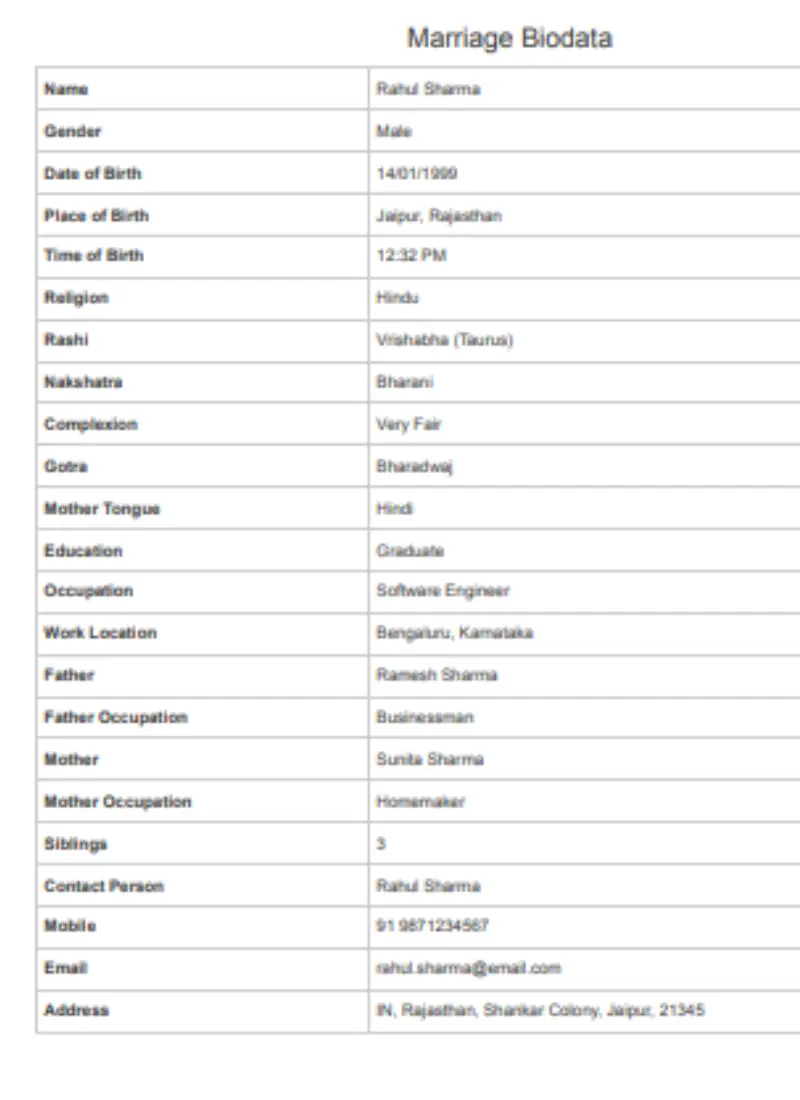
What is a Marriage Biodata?
A marriage biodata is a document that summarizes key information about an individual for matrimonial purposes. It typically includes personal details, family background, education, profession, and lifestyle preferences. Unlike a resume, which focuses solely on professional qualifications, a marriage biodata combines both personal and professional information to give a holistic view of the person.
Choosing Word as your biodata format has many advantages. Word documents are editable, easy to format, and compatible with most systems. You can also convert your Word biodata to PDF when needed, making it suitable for online sharing.
Why Use Word Format for Marriage Biodata?
Using Microsoft Word for your biodata is highly practical. Word provides flexibility and professional formatting options that other formats may lack.
Some key reasons to choose Word include:
- Easy Editing: You can add, remove, or update sections anytime.
- Customizable Layouts: Use headings, tables, and bullet points to create a clean design.
- Multiple Format Options: Save your biodata in .doc, .docx, or convert it to PDF.
- Compatibility: Works on most computers, mobile devices, and printing systems.
With Word, you can maintain a polished look while ensuring that the information is accurate and up-to-date.
Key Sections of a Marriage Biodata
A well-organized marriage biodata is divided into clear sections. Each section highlights essential information that a prospective partner or family may want to know.
Personal Information
Personal details form the foundation of your biodata. It introduces you clearly and professionally.
Include:
- Full name
- Date of birth and age
- Gender and marital status
- Contact information (phone number, email)
- Profile photo (optional)
A biodata without a photo is also acceptable. In such cases, focus on maintaining clarity and structure to ensure it remains professional.
Family Details
Family background is an important part of a marriage biodata. It gives an idea of your family environment and values.
Include:
- Parents’ names and occupations
- Number of siblings and brief details
- Family location and values (optional)
Providing clear family information helps prospective families understand your background and builds trust.
Educational Background
Education details show your academic qualifications and achievements. Keep this section clear and concise.
Include:
- School, college, and university names
- Degrees and years of completion
- Notable achievements or certifications
Highlighting relevant achievements can make your biodata stand out, especially in professional matrimonial circles.
Professional Details
Professional information gives an insight into your career and accomplishments. It also reflects your stability and responsibility.
Include:
- Current job title and organization
- Past work experience (if any)
- Responsibilities and notable achievements
- Optional: income details
A well-presented professional section enhances credibility and professionalism in your biodata.
Lifestyle and Interests
Sharing hobbies and interests adds a personal touch and makes your biodata more relatable.
Include:
- Hobbies and creative pursuits
- Travel experiences
- Fitness or sports activities
- Reading, writing, or other personal interests
This section helps show your personality beyond academics and career.
Partner Preferences (Optional)
Some biodata formats include partner preferences to clarify expectations. This section should be brief, clear, and positive.
Include:
- Age range
- Education level
- Preferred profession
- Location preferences
A friendly note about openness and flexibility can make this section more approachable.
How to Create a Marriage Biodata in Word
Creating a marriage biodata in Word is simple when you follow a clear process. Word offers multiple tools to design your biodata efficiently.
Step-by-step guide:
- Open a Blank Word Document – Start fresh or use a pre-made template.
- Set Page Layout – Use A4 size, 1-inch margins, and clear font styles like Calibri or Arial.
- Add Headings and Subheadings – Use bold headings for each section to enhance readability.
- Use Tables for Structured Data – For personal details, family background, and education.
- Use Bullet Points – To highlight achievements, skills, or hobbies.
- Add Optional Photo – Insert a professional image if desired.
- Proofread Carefully – Check grammar, spelling, and accuracy before finalizing.
Free Marriage Biodata Templates in Word
Templates make creating biodata faster and ensure a professional layout. Free templates are widely available and easy to customize.
Benefits of using a template:
- Saves time and effort
- Ensures a neat and professional design
- Provides ready sections for personal, family, and professional details
- Compatible with Word for easy editing
Popular template types:
- Professional and detailed
- Simple and minimalistic
- Without photo
- Modern and creative designs
Tips for Making Your Marriage Biodata Stand Out
Creating an eye-catching biodata is about clarity, honesty, and presentation.
Best practices:
- Keep information accurate and honest
- Use short and active sentences
- Maintain clean formatting and proper alignment
- Highlight achievements and unique qualities
- Choose a professional font and size for easy reading
A well-structured and appealing biodata increases your chances of leaving a positive impression.
Common Mistakes to Avoid in a Marriage Biodata
Avoid these mistakes to make your biodata professional and credible:
- Overloading information that is not relevant
- Using cluttered or confusing layouts
- Forgetting to include contact details
- Exaggerating achievements or personal details
- Ignoring proofreading and formatting
A simple, clean, and clear biodata is always more effective than an overly complicated one.
Download Marriage Biodata in Word and PDF
Once your biodata is ready, you can download and save it in multiple formats for convenience. Word allows you to:
- Save in .doc or .docx for easy future editing
- Convert to PDF for online sharing or printing
- Customize layout and content anytime
Marriage Biodata Word Format Without Photo
Sometimes a photo may not be required or preferred. A photo-less biodata can still look professional if it follows proper structure and formatting.
Tips for photo-less biodata:
- Focus on clear headings and bullet points
- Ensure contact and personal details are easy to find
- Highlight accomplishments and interests to make it engaging
- Maintain uniform font style and size
Even without a photo, your biodata can be visually appealing and professional.
FAQs About Marriage Biodata Format in Word
What is a marriage biodata and why is Word format recommended?
A marriage biodata is a document that summarizes personal, family, education, and professional details for matrimonial purposes. Word format is recommended because it’s easy to edit, customize, and format, making it simple to create a professional-looking biodata quickly.
Can I create a marriage biodata in Word without any prior experience?
Yes! Word is user-friendly, and you can start with a blank document or a ready-made template. Using tables, headings, and bullet points helps structure your biodata neatly, even if you are not familiar with design or formatting.
Are there free marriage biodata templates available in Word?
Absolutely. Many websites offer free downloadable Word templates. These templates come in professional, simple, and photo-less formats, so you can choose one that suits your style and personalize it with your details.
Do I need to include a photo in my marriage biodata Word document?
Including a photo is optional. A photo can make your biodata more personal, but a clean, well-structured biodata without a photo is equally professional and widely accepted, especially if privacy is a concern.
How long should a marriage biodata in Word be?
Ideally, 1–2 pages are sufficient. Focus on essential details like personal info, family background, education, profession, and interests. Keeping it concise ensures it is easy to read and makes a positive impression.
Can I convert my Word marriage biodata to PDF?
Yes. Once your biodata is ready in Word, you can save it as a PDF by selecting “File → Save As → PDF.” This preserves the layout and makes it easy to share online or via email.
Can the same marriage biodata Word document be used for multiple matrimonial sites?
Yes. One Word document can be adapted for different platforms. You can update sections like partner preferences or remove sensitive details before uploading, ensuring it stays relevant for each platform.
What are the key sections to include in a marriage biodata Word format?
A complete biodata usually includes: personal information, family details, education, professional background, lifestyle and interests, and optionally, partner preferences. Using headings and bullet points keeps it organized and readable.